AiiDA & AiiDAlab: How They Work Together
A short overview of the AiiDAlab interface layer and the AiiDA components beneath it.
Overview
AiiDA (Automated Interactive Infrastructure and Database for Computational Science) is a workflow management engine that runs, tracks, and stores computational science calculations while preserving their full provenance. AiiDAlab sits directly on top of AiiDA as a browser-based interface layer: it turns AiiDA’s Python API into a collection of interactive Jupyter/web applications (plugins/apps) so that users can configure resources, submit workflows, and inspect results without writing code.
In short: AiiDAlab is what the user sees and clicks; AiiDA is the engine that actually orchestrates and records the work. Everything AiiDAlab does is ultimately a call into AiiDA.
Flow Diagram
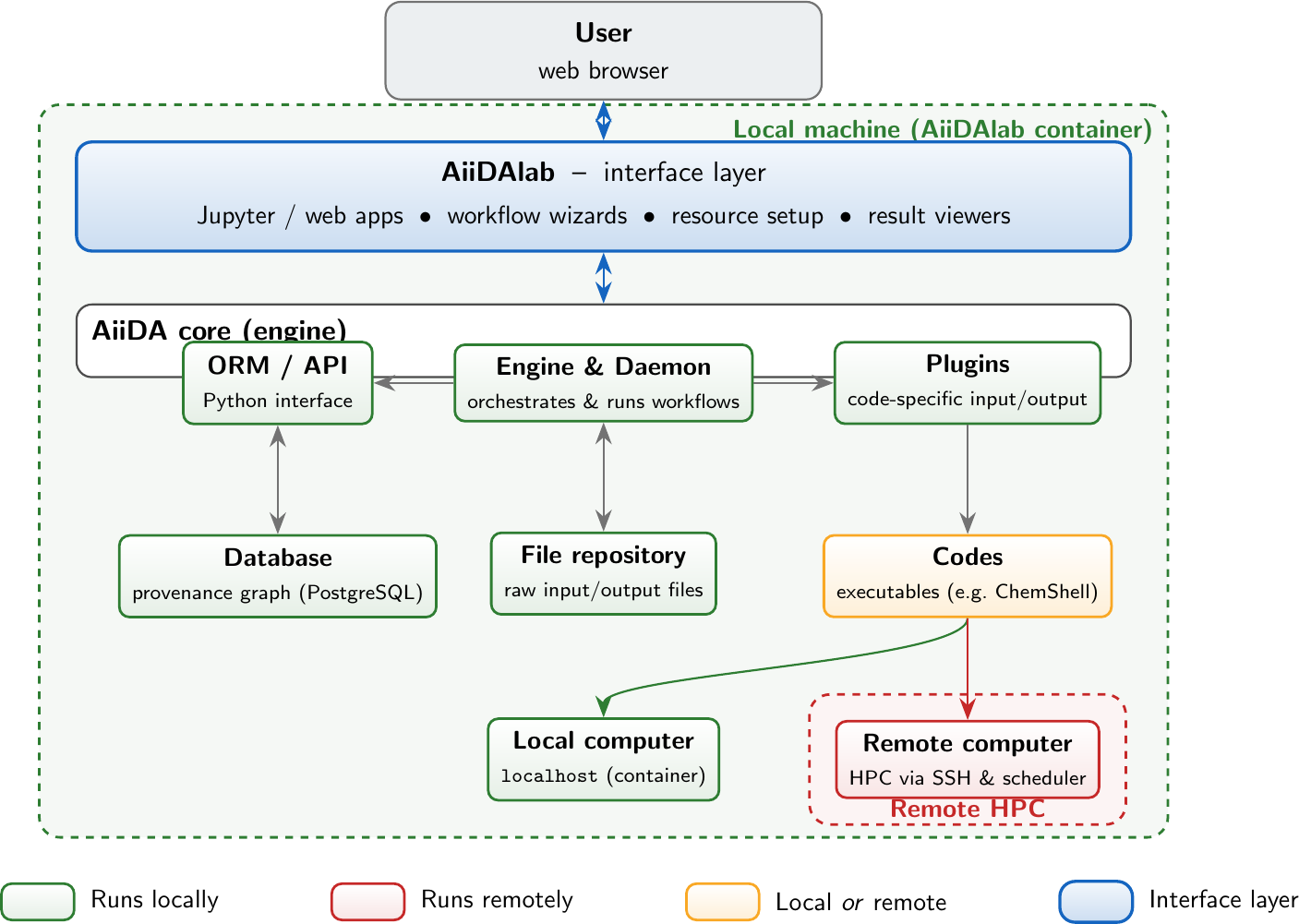
AiiDAlab is a thin interface layer on top of the AiiDA engine. The engine,
its API/ORM, plugins, database, and file repository all live on the local
machine (inside the AiiDAlab container). Codes and plugins are used for work
that may run either locally or on a remote HPC, and computers are the actual
execution targets: localhost inside the container, or a remote cluster
reached over SSH.
Key Components
- AiiDAlab
The interface layer. A set of browser-based apps (served from a container) that expose AiiDA functionality — setting up resources, building and submitting workflows, and visualising results — without requiring the user to write Python. Contains its own application store for installing and managing specific applications.
- Engine & Daemon
The heart of AiiDA. The daemon is a long-running local process that picks up submitted workflows/calculations, drives them through their steps, submits jobs to computers, and records everything. Local.
- ORM / API
The Python object layer through which AiiDAlab (and users) create nodes, query data, and submit work. Local.
- Plugins
Code-specific adapters that know how to write the input files for a given program and parse its output back into AiiDA data nodes (e.g. the ChemShell plugin). They are installed locally either via an AiiDAlab application plugin (as a Python dependency) or individually through PyPI/conda-forge.
- Codes
AiiDA’s representation of an executable (e.g.
chemsh). Each code is attached to a computer, so a code can point at a local executable (e.g.chemsh@localhost) or an executable on a remote HPC. Codes can be autoconfigured as part of the AiiDAlab application to simplify user accessibility, though it can become more difficult for more complex codes.- Database
A PostgreSQL database storing the provenance graph — every calculation, its inputs, outputs, and how they connect. Local (inside the container / on the machine running AiiDA).
- File repository
On-disk storage for the raw input and output files referenced by the database nodes. Local.
- Local computer
The
localhostexecution target inside the AiiDAlab container. Used for lightweight jobs or bundled codes such as a containerised ChemShell installation.- Remote computer
An external HPC cluster registered with AiiDA. Reached over SSH, with jobs submitted through the machine’s scheduler (e.g. SLURM). Remote.
Key Development Considerations
All AiiDA plugins must be available through PyPI.
All AiiDAlab applications should be available through the AiiDAlab app registry and run independently of locally configured software.
All
aiida*plugins andaiidalab*apps must not depend on the specific software backend (i.e. minimal Python dependency tree).All data must be storable as an AiiDA data node to enable interaction between software.
Pre-bundled containerised deployments should be avoided where possible, relying on existing AiiDAlab UI components instead.